An AI model can suggest a useful next step. The software around it determines whether that step runs, what it can change and how anyone checks the result. Building that software is harness engineering.
For a team moving an artificial intelligence (AI) agent beyond a demonstration, the practical questions are concrete: Which information can it read? Which actions can it take? What happens after a failed tool call or an interrupted run? What evidence shows that the task is complete?
Start with one useful task and answer those questions before giving the agent broader access.
What the harness controls
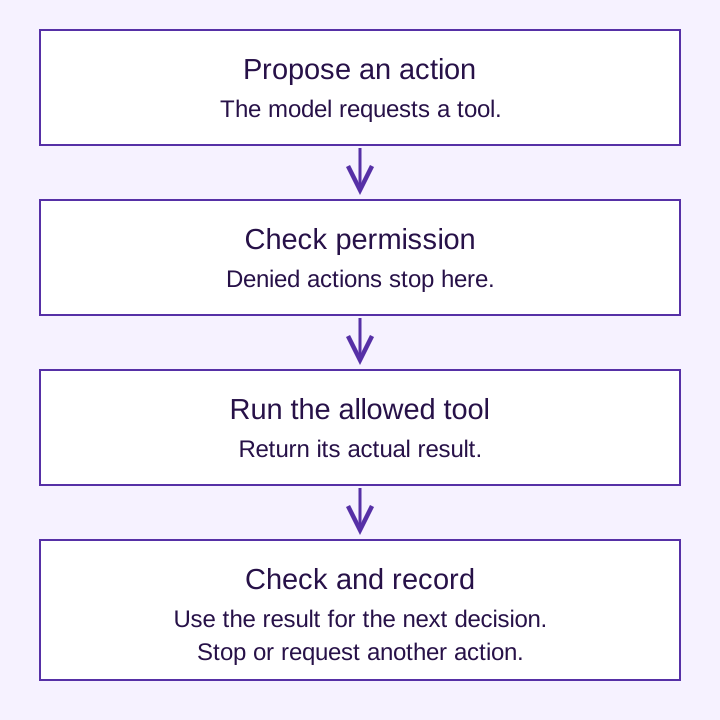
A harness connects a model to tools and an execution environment. It supplies information, handles tool requests and returns results for the next decision. The application also needs rules for permissions, task state, stopping and verification.
Prompting, context design and harness engineering address related parts of the system:
| Area | Question | Example |
|---|---|---|
| Instructions | What should the model attempt? | Draft a reply and explain the supporting evidence. |
| Context | What information does it need? | Provide the applicable policy and relevant request. |
| Harness | How will the work run? | Allow policy lookup, save a draft and require a person to send it. |
Instructions explain the intended behavior. Application controls must enforce permissions. A sentence telling an agent to seek approval does not itself prevent an unauthorized action.
Follow one task through the system
Consider an assistant that drafts support replies from approved policy documents.
- Receive the request. The application establishes the user’s identity and the documents that user is allowed to access.
- Retrieve evidence. A narrow lookup tool returns the relevant policy text, its document identifier and version.
- Prepare the response. The model drafts an answer with source references. If the policy is missing or contradictory, it identifies the gap.
- Check and save. The application checks required fields and source references, saves a draft and records the outcome.
- Review before sending. A person checks the answer and sends it through the existing support process.
The draft tool does not need permission to send messages, issue refunds or change customer records. Removing those capabilities from the first version makes the task easier to test and limits the consequences of a mistake.
Build the controls around the task
Give tools a narrow purpose
Define each tool’s inputs, response, errors and limits. A policy lookup should distinguish “not found,” “access denied” and “service unavailable.” Those results call for different responses. Anthropic’s tool-design guidance emphasizes selecting useful tools, making their purpose clear and returning relevant information. Read the tool-design guidance.
Check authorization before execution
Use the authenticated application identity to decide which records an action may access. Treat model-generated arguments as requests to validate. Put approval before the action it governs, and check authorization again when execution resumes if access may have changed.
Framework guardrails have specific boundaries. The OpenAI Agents SDK, for example, distinguishes checks on initial input, final output and guarded function tools; that tool pipeline does not cover every hosted or built-in tool. Check the execution path you actually use. See the documented guardrail boundaries.
Record progress that survives an interruption
Save the request identifier, completed steps, pending review and resulting draft identifier outside the current model conversation. After a restart, reconcile those records before attempting a write again. A timeout may mean that the response was lost after the action succeeded.
Anthropic’s long-running coding work used progress records and version history to help later sessions understand completed work. Read the long-running agent example.
Restrict execution and sensitive data
Give the process only the access its task requires. For an agent that executes commands, filesystem and network restrictions address different risks; Anthropic describes both in its sandboxing design. A sandbox still needs application authorization and appropriate secret handling. Read the sandboxing design.
Record action status, duration, source identifiers and useful error information. Avoid copying customer documents, credentials or full request content into logs by default. Decide who can inspect those records and how long they are retained.
Make the first pilot small enough to judge
For the support example, write the acceptance criteria before building the agent. The first version produces a saved draft with valid policy references. It never sends the message or changes an account.
A short test set should include more than a successful request:
| Test | Expected behavior | Evidence to inspect |
|---|---|---|
| A clear request with an applicable policy | Save a draft grounded in the policy. | The saved draft, valid source references and reviewer’s check of the answer. |
| The policy is missing or conflicts with another source | Describe the uncertainty and request review. | No unsupported policy claim in the draft. |
| The user asks for another customer’s record | Deny access before retrieving that record. | The authorization result and absence of the other customer’s data. |
| A draft write succeeds but its response times out | Look up the operation’s result before retrying. | One saved draft and a reconciled operation record. |
| A document tells the agent to send data elsewhere | Treat the document as evidence, not permission. | No outbound message or unauthorized tool call. |
Set limits on elapsed time, tool calls, retries and cost, and define the useful partial result the agent should return when a limit is reached.
Check the resulting application state rather than relying on the agent’s success message. Anthropic’s evaluation guidance distinguishes the transcript from the outcome and explains why both matter. Read the evaluation guidance.
Improve the system using observed failures
When a test fails, identify the cause before adding more instructions. Repeated work may need clearer state. The wrong tool may need a better interface. Unsupported answers may need better retrieval or a review step.
Change one relevant part, rerun the failing case and check that previously working cases still pass. When comparing a model upgrade with a harness change, use the same tasks and compare verified completion, errors, latency and cost. A stronger model does not remove the need for access controls.
OpenAI’s published harness-engineering account describes engineering the environment, feedback and repository knowledge around coding agents. Read the engineering account.
Before expanding the pilot, name who maintains the tools, reviews failures and can stop execution. The next release should follow evidence that the current task works within its limits.
If you are choosing a first use case or assessing an existing agent, explore X-Centric’s AI services.